Google Magenta : 구글에서 예술과 음악 창작을 지원하기 위해 진행한 AI 오픈소스 프로젝트
https://magenta.tensorflow.org/demos
Demos
A list of apps powered by Magenta models including fun toys, creative applications, research notebooks, and professional-grade tools that will benefit a wide...
magenta.withgoogle.com
https://magenta.tensorflow.org/demos/colab/
Colab Notebooks
A research project exploring the role of machine learning in the process of creating art and music.
magenta.withgoogle.com
Magenta는 프로젝트이고 이 프로젝트에서 만든 여러 모델들이 있음
Music VAE, Performance RNN, Music Transformer 등등
MIDI로 만든 멜로디가 있고 그 MIDI 정보만을 가지고 뒤에 멜로디를 자연스럽게 생성해주는 AI가 필요 했음.
Magenta 프로젝트의 Music Transformer 모델의 Continue 기능이 MIDI 뒷부분을 추론하는 기능.
그래서 로컬에서 설치를 진행함.
개발 환경
OS : Windows11
GPU : NVIDIA 3070
Miniconda 설치
https://www.anaconda.com/download/success
Download Success | Anaconda
Download Now Download Anaconda Distribution or Miniconda by choosing the proper installer for your machine. Learn the difference from our Documentation. Distribution Installers Download Download for Mac Download for Apple Silicon Download for Intel For
www.anaconda.com
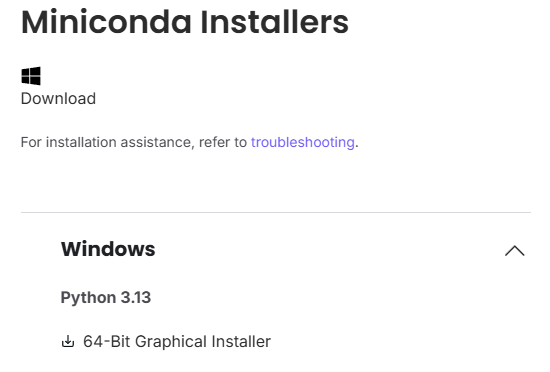
AI를 개발을 할때 파이썬 개발환경에서 여러 라이브러리들을 불러오고 사용해야하는데 버전 충돌이 많이 일어나고 관리가 복잡함.
그래서 별도의 독립적인 가상 개발환경을 만들어서 관리를 쉽게 하면 용이함.
Anaconda는 가상 파이썬 개발환경을 쉽게 만들고 관리할 수 있는 통합 플랫폼.
Miniconda는 Anaconda의 경량화 버전으로 conda만 포함된 최소 구성으로 훨씬 유연하게 환경 구성 가능.
최신 Miniconda의 파이썬 버전이 3.13으로 설치되어서 가상 환경을 만들면 기본 파이썬 버전이 3.13이 되지만
가상 환경을 생성할때 별돌도 파이썬 버전을 지정하면 다른 파이썬 버전으로 가상환경을 만들 수 있음.
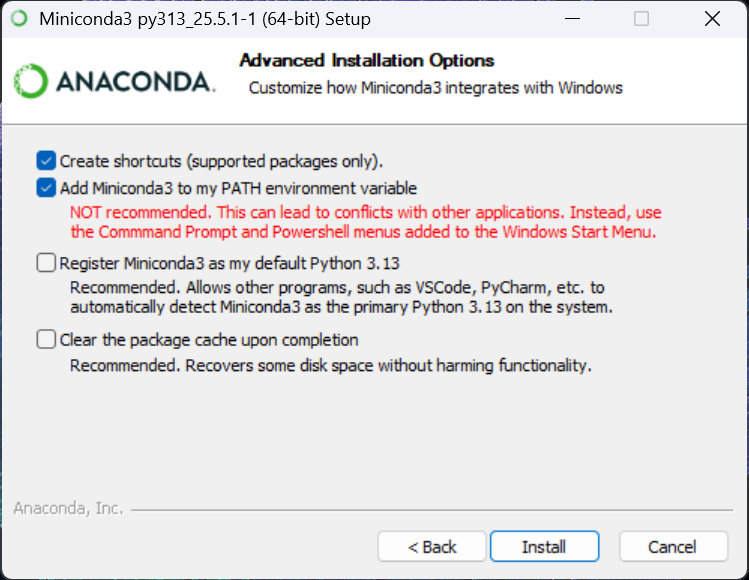
설치 시 두번쨰 옵션(Add Miniconda3 to my PATH environment variable) 체크
환경 변수에 등록 되어야지 명령 프롬프트에서 사용 가능
Google Magenta 설치 호환 버전 (25년 7월 기준)
- 파이썬 3.7
- magenta 2.1.4
- tensor2tensor 1.15.7 (Music Transformer를 쓰기 위해 필요)
설치 코드 목록
conda create -n magenta python=3.7
conda activate magenta
pip install magenta==2.1.4
set PYTHONUTF8=1
pip install tensor2tensor==1.15.7
pip install gym==0.21.0 importlib-metadata==4.13.0 tensorflow-probability==0.7.0
conda install cudatoolkit=11.2 cudnn=8.1.0 -c conda-forge
명령 프롬프트 열고
"conda create -n magenta python=3.7"
magenta라는 이름의 가상환경을 파이썬 3.7버전으로 생성
"conda activate magenta"
방금 생성한 가상환경 활성화
"pip install magenta==2.1.4"
magenta 설치
"set PYTHONUTF8=1"
tensor2tensor 설치시 한국어로 인한 인코딩 문제 때문에 오류가 나는 것을 방지하기 위해 설정
"pip install tensor2tensor==1.15.7"
tensor2tensor 설치
"pip install gym==0.21.0 importlib-metadata==4.13.0 tensorflow-probability==0.7.0"
tensor2tensor에 포함된것들이지만 호환되는 버전으로 다운그레이드
"conda install cudatoolkit=11.2 cudnn=8.1.0 -c conda-forge"
Nvidia GPU를 쓰기위한 도구 설치
Music Transformer 모델 다운로드 링크
https://storage.googleapis.com/magentadata/models/music_transformer/checkpoints/unconditional_model_16.ckpt.data-00000-of-00001

https://storage.googleapis.com/magentadata/models/music_transformer/checkpoints/unconditional_model_16.ckpt.meta

https://storage.googleapis.com/magentadata/models/music_transformer/checkpoints/unconditional_model_16.ckpt.index
위 3개 다 필요하며
미디를 인풋으로 받아서 뒷부분을 추론하는 Continue 기능은 위 무조건부 모델을 사용
Music Transformer Continue 기능 GPU 연산 파이썬 스크립트
#!/usr/bin/env python3
"""
Music Transformer Continue 기능 테스트
test.mid 파일을 primer로 사용하여 멜로디 연장
"""

import os
import sys
import numpy as np
import tensorflow.compat.v1 as tf

# TensorFlow 1.x 호환 모드 활성화
tf.disable_v2_behavior()

from tensor2tensor import models
from tensor2tensor import problems
from tensor2tensor.data_generators import text_encoder
from tensor2tensor.utils import decoding
from tensor2tensor.utils import trainer_lib

from magenta.models.score2perf import score2perf
import note_seq

# 설정
MODEL_PATH = r"C:\Users\User\miniconda3\envs\magenta\model\unconditional_model_16.ckpt"
PRIMER_PATH = r"C:\test\test.mid"
OUTPUT_DIR = r"C:\test"

# 1. Primer MIDI 파일 로드 및 처리
print("\n🔍 1. Primer 파일 분석")
print("-" * 40)

try:
    # MIDI 파일을 NoteSequence로 변환
    primer_ns = note_seq.midi_file_to_note_sequence(PRIMER_PATH)

    print(f"총 재생 시간: {primer_ns.total_time:.2f}초")
    print(f"노트 개수: {len(primer_ns.notes)}")
    print(f"템포: {primer_ns.tempos[0].qpm if primer_ns.tempos else '정보 없음'}")

    # 기본 정보 출력
    if primer_ns.notes:
        pitches = [note.pitch for note in primer_ns.notes]
        print(f"음역: {min(pitches)} - {max(pitches)}")
        print(f"첫 번째 노트: pitch={primer_ns.notes[0].pitch}, start={primer_ns.notes[0].start_time:.2f}s")
        print(f"마지막 노트: pitch={primer_ns.notes[-1].pitch}, end={primer_ns.notes[-1].end_time:.2f}s")

    # 서스테인 페달 처리
    primer_ns = note_seq.apply_sustain_control_changes(primer_ns)

    # 드럼 제거 (있는 경우)
    if any(note.is_drum for note in primer_ns.notes):
        print("⚠️  드럼 노트 제거 중...")
        notes = [note for note in primer_ns.notes if not note.is_drum]
        del primer_ns.notes[:]
        primer_ns.notes.extend(notes)

    # 악기 및 프로그램 설정
    for note in primer_ns.notes:
        note.instrument = 1
        note.program = 0

    print("✅ Primer 파일 처리 완료")

except Exception as e:
    print(f"❌ ERROR: Primer 파일 처리 실패: {e}")
    sys.exit(1)

# 2. 모델 설정
print("\n🤖 2. Music Transformer 모델 설정")
print("-" * 40)

try:
    # Problem 정의
    class PianoPerformanceLanguageModelProblem(score2perf.Score2PerfProblem):
        @property
        def add_eos_symbol(self):
            return True

    problem = PianoPerformanceLanguageModelProblem()
    encoders = problem.get_feature_encoders()

    # HParams 설정
    model_name = 'transformer'
    hparams_set = 'transformer_tpu'

    hparams = trainer_lib.create_hparams(hparams_set=hparams_set)
    trainer_lib.add_problem_hparams(hparams, problem)
    hparams.num_hidden_layers = 16
    hparams.sampling_method = 'random'

    # Decoding HParams 설정
    decode_hparams = decoding.decode_hparams()
    decode_hparams.alpha = 0.0
    decode_hparams.beam_size = 1

    print("✅ 모델 설정 완료")

except Exception as e:
    print(f"❌ ERROR: 모델 설정 실패: {e}")
    sys.exit(1)

# 3. Estimator 생성
print("\n⚙️  3. Estimator 생성 및 모델 로드")
print("-" * 40)

try:
    # Estimator 생성
    run_config = trainer_lib.create_run_config(hparams)
    estimator = trainer_lib.create_estimator(
        model_name, hparams, run_config,
        decode_hparams=decode_hparams
    )

    # Primer 인코딩
    targets = encoders['targets'].encode_note_sequence(primer_ns)
    print(f"인코딩된 primer 길이: {len(targets)} 토큰")

    # EOS 토큰 제거
    targets = targets[:-1]

    # 생성할 길이 계산
    max_length = 4096
    decode_length = max(0, max_length - len(targets))

    if len(targets) >= max_length:
        print("⚠️  WARNING: Primer가 최대 길이를 초과합니다. 생성되지 않을 수 있습니다.")
        decode_length = 512  # 최소한의 생성 시도

    print(f"생성할 토큰 길이: {decode_length}")

    # Input generator 생성
    def input_generator():
        while True:
            yield {
                'targets': np.array([targets], dtype=np.int32),
                'decode_length': np.array(decode_length, dtype=np.int32)
            }

    # Prediction 시작
    input_fn = decoding.make_input_fn_from_generator(input_generator())
    samples = estimator.predict(input_fn, checkpoint_path=MODEL_PATH)

    print("✅ Estimator 생성 및 모델 로드 완료")

except Exception as e:
    print(f"❌ ERROR: Estimator 생성 실패: {e}")
    sys.exit(1)

# 4. 음악 생성
print("\n🎼 4. 음악 생성 중...")
print("-" * 40)
print("⏳ 생성 중... (시간이 걸릴 수 있습니다)")

try:
    # 첫 번째 샘플을 건너뛰기 ("burn" one)
    _ = next(samples)

    # 실제 생성
    sample_ids = next(samples)['outputs']
    print(f"생성된 토큰 수: {len(sample_ids)}")

    # 디코딩
    def decode(ids, encoder):
        ids = list(ids)
        if text_encoder.EOS_ID in ids:
            ids = ids[:ids.index(text_encoder.EOS_ID)]
        return encoder.decode(ids)

    # MIDI 파일로 디코딩
    midi_filename = decode(sample_ids, encoder=encoders['targets'])
    generated_ns = note_seq.midi_file_to_note_sequence(midi_filename)

    print("✅ 음악 생성 완료")

except Exception as e:
    print(f"❌ ERROR: 음악 생성 실패: {e}")
    import traceback
    traceback.print_exc()
    sys.exit(1)

# 5. 결과 합성 및 저장
print("\n💾 5. 결과 저장")
print("-" * 40)

try:
    # Primer와 생성된 부분 결합
    combined_ns = note_seq.concatenate_sequences([primer_ns, generated_ns])

    # 파일 저장
    output_file = os.path.join(OUTPUT_DIR, "test_continued.mid")
    note_seq.sequence_proto_to_midi_file(combined_ns, output_file)

    print(f"✅ 결과 저장 완료: {output_file}")

    # 생성된 부분만 따로 저장
    generated_only_file = os.path.join(OUTPUT_DIR, "test_generated_only.mid")
    note_seq.sequence_proto_to_midi_file(generated_ns, generated_only_file)
    print(f"✅ 생성 부분만 저장: {generated_only_file}")

except Exception as e:
    print(f"❌ ERROR: 결과 저장 실패: {e}")
    sys.exit(1)
Multitrack MusicVAE 모델 다운로드 링크(코드 조건부 생성이 가능한 VAE 모델)
https://storage.googleapis.com/download.magenta.tensorflow.org/models/music_vae/multitrack/model_chords_fb64.ckpt.data-00000-of-00001

https://storage.googleapis.com/download.magenta.tensorflow.org/models/music_vae/multitrack/model_chords_fb64.ckpt.index

https://storage.googleapis.com/download.magenta.tensorflow.org/models/music_vae/multitrack/model_chords_fb64.ckpt.meta
코드 조건부 생성해야할 경우 사용할 모델
ImprovRNN
http://download.magenta.tensorflow.org/models/chord_pitches_improv.mag
.mag 모델 다운로드 링크
'작업 기록' 카테고리의 다른 글
| StreamDiffusion Conda 설치 과정 기록 (0) | 2025.10.26 |
|---|---|
| '2D Video' To '3D Stereo Video' AI 구동 방법(Tencent AI Lab - StereoCrafter) (0) | 2025.05.10 |
| 유니티 OpenCV에셋, Face Expression 작업 기록 (0) | 2023.05.24 |
| NDI,OSC 네트워크 이슈 (0) | 2022.07.14 |
| rsvfx에서 빌드 오류 (0) | 2022.03.14 |